
QR-Based QueueManagement App Built forModern Service.

Manage customer queues, simplify daily operations and keep your team informed with one intelligent queue management platform.

qeazy DashboardLive QueueTable ManagementWait TimesUsersGuest HistoryActivity
TodayLive queue
QR code+ Add walk-in
Waiting6
Notified2
Seated today14
#CustomerPeopleWaitingStatus
1Aarav JoshiQR check-in414 minOn the waySeat
2Meera ShahQR check-in211 minNotifiedCall
3Ananya RaoQR check-in38 minWaitingNotify
4Kabir MehtaWalk-in15 minWaitingNotify
5Priya NairQR check-in22 minWaitingNotify

ActivityLive

Meera Shah notified4 min ago
5 people joinedNew QR check-in
Aarav Joshi is on the wayCustomer notified · just now
Join the queueThe Olive Table
Your position#3Est. wait ~8 min
It’s almost your turn, Ananya.Please head back - you’re next.
Ahead of you
1Aarav JoshiOn the way
2Meera ShahNotified
0 apps
for customers to install
1 tap
to notify the next customer
2 sec
average person check-in
Free
during early access
Customers standing in a long line

Most queues still run on paper lists, guesswork and repeated questions.

Customers can’t see where they stand. Your team can’t see who’s next.

Stop managing queues manually. Run one organised queue.

Paper lists and shouted names create extra work for your team and uncertainty for customers. Qeazy brings check-ins, walk-ins and updates into one live queue.

Before Qeazy

Managing queues the hard way.

Waiting list - paper

Aarav J. - 46:40

Meera - 26:45

Ananya R. - 3 (called?)6:52

Kabir - 1?

Priya + 17:01

  • Manually recording customer entries.
  • Unorganised waiting lists.
  • Repeated questions about waiting times.
  • Manually updating customers.
  • Limited visibility into who’s waiting.
With Qeazy

Everything in better control.

1Aarav Joshi · 4 peopleOn the way
2Meera Shah · 2 peopleNotified
3Ananya Rao · 3 peopleWaiting
  • QR-based customer check-in.
  • Organised digital queue entries.
  • Clear queue positions and waiting status.
  • Customer notifications.
  • Centralised queue visibility.

Everything your team needs to keep the queue moving.

From QR check-in to the moment a customer is served, Qeazy gives your team the tools to run the queue with clarity and control.

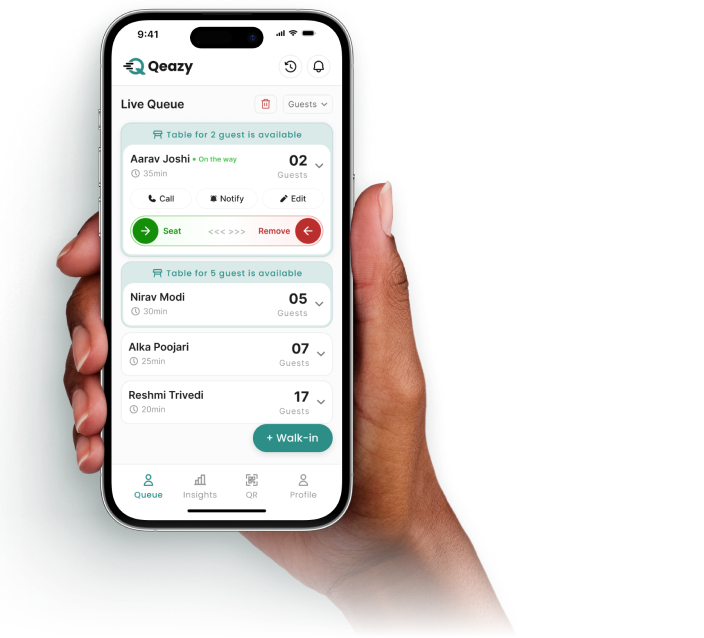
Live queue

Your entire queue. One organised view.

See every waiting customer with their number of people, waiting time and status and call, notify, seat or remove them from one screen.

Learn more about live queue


QR check-in

Make joining your queue effortless.

Customers scan your QR code, enter their details and join your queue without installing an app.

Learn more about qr check-in
Notifications

Tell customers when it’s their turn.

Notify customers as their turn approaches, so they can wait wherever they like.

Learn more about notifications
Walk-ins

Bring every customer into one queue.

Add walk-in customers in seconds. They join the same queue as QR check-ins.

Learn more about walk-ins
Customer status

Customers always know where they stand.

Customers can check their position, status and estimated wait time where configured.

Learn more about customer status
Customer details

Keep customer information organised.

View customer details, edit entries and contact customers from one card.

Learn more about customer details
Merchant dashboard

Your operations at a glance.

See who is waiting, who has been notified and how many customers you’ve served today.

Learn more about merchant dashboard

Understand how your queue really performs.

Qeazy keeps a history of your queue, so you can look back at busy days, waiting times and how customers moved through it.

  • Entries, seated customers and cancellations.
  • Average waits and your busiest hours.
  • Guest history with how every visit ended.
See the merchant dashboard
Simple to set up. Easy to manage.

Up and running in three steps.

Sign up, set up your business and start accepting customers. That’s all it takes to get your queue running.

Create your business account with your business name, email, mobile number and a password. It’s free during early access.

  1. 01. Sign up

    Create your business account with your business name, email, mobile number and a password. It’s free during early access.

  2. 02. Set up your business

    Add your business details, set your working hours and wait times and get your QR code.

  3. 03. Start accepting customers

    Put up your QR code. Customers scan it to join and your team adds walk-ins to the same live queue.

STEP01/ 03
Create your accountFree during early access
Business name
The Olive Table
Email
hello@olivetable.in
Mobile number
+91 98••• ••214
Password
••••••••••
Get Early Access

Never lose track of who’s waiting.

See who’s waiting, who’s been notified and what needs attention, in the Merchant Web App on desktop or tablet and on Android.

Today
Live queue
QR code + Add walk-in
All · 8Waiting · 6Notified · 2
#CustomerPeopleWaitingStatus
1Aarav JoshiQR check-in414 minOn the waySeat
2Meera ShahQR check-in211 minNotifiedCall
3Ananya RaoQR check-in38 minWaitingNotify
4Kabir MehtaWalk-in15 minWaitingNotify
5Priya NairQR check-in22 minWaitingNotify
Customer notified · 2 min agoMeera Shah is next in line

Manage your queue beyond the desk.

The Qeazy Android app puts your live queue in your pocket, with the same role-based access as the web app.

  • See and update the live queue.
  • Add walk-ins, call and notify customers.
  • Only the actions your role allows.
Early access is open

Run your queue free. Join early.

Qeazy is free during early access, with every feature included for your whole team. No plans to compare, nothing to upgrade.

Questions about Qeazy? We’ve got answers.

What is Qeazy?

Qeazy is a queue management platform for service businesses. Customers join your queue by scanning a QR code, your team manages everyone from one live queue and customers are notified when their turn approaches.

Do customers need to download an app?

No. Customers scan your QR code and join the queue in their phone’s browser. They don’t need an account or an app.

Which businesses can use Qeazy?

Qeazy is built for businesses where customers wait for a service: restaurants and cafés, clinics, salons and studios, retail and service counters, events and venues and other service businesses.

Can we add walk-in customers?

Yes. Your team can add walk-in customers directly and they appear in the same live queue as customers who checked in with the QR code.

Can users use Qeazy without seeing management settings?

Yes. Qeazy has separate access for owners, managers and users. Users see the operational tools their role allows, such as the live queue and customer details and not business settings.

How much does Qeazy cost?

Nothing. Qeazy is free during early access, with every feature included.

How are customers told it’s their turn?

Your team taps Notify on the customer’s entry in the live queue and the customer is told their turn is approaching.

Can customers see their place in the queue?

Yes. Their status page shows their position and status, plus an estimated wait where your business has set wait times.

Make every queue easier to manage.

Set up your business, print your QR code and start accepting customers. Qeazy is free during early access.