- Home
- Platform
- Android app
Your live queue, in your pocket.
The Qeazy Android app lets owners, managers and users manage supported queue operations from their phone, with the same role-based access as the web app.
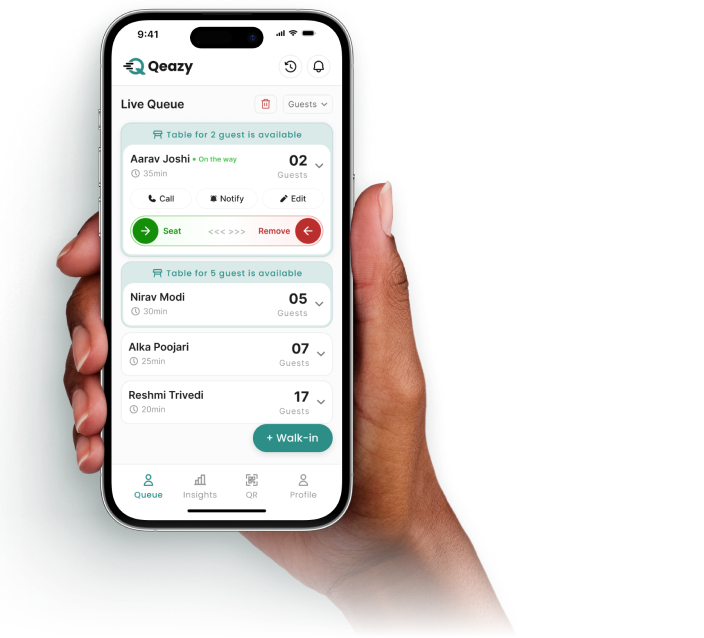
Run the queue right here.
This is the live queue your team sees in the app. Tap Seat or Remove on any customer or add a walk-in. No download needed.
 Live queueThe Olive Table · Today
Built for the floor.
The jobs your team does a hundred times a shift, each a tap away.
- Each person sees only the menus their role allows
- Swipe to seat or serve or remove an entry
- QR check-ins and walk-ins in one list
One queue, on every screen.
Your team on the floor and your manager at the desk work from the same live queue. Seat someone on the phone and the web app shows it too.
- Same customers, same order
- Same statuses everywhere
- Each person keeps their role
Get Qeazy on Android.
Free on Google Play for owners, managers and users. Customers don’t need it: they join in their browser.
Get it onGoogle PlayFrequently asked questions
Where can I download the Qeazy app?
The Qeazy business app is available on Google Play for Android.
Do my customers need the app?
No. The app is for your business. Customers join your queue in their phone’s browser.
Does the app have every web app feature?
The Android app focuses on running the queue on the go. Owners and managers use the Merchant Web App for the full set of management tools.
Is Qeazy free?
Yes. Qeazy is free during early access, with every feature included for your whole team.
Can we add customers who don’t scan the QR code?
Yes. Your team can add walk-in customers directly and they join the same live queue in the right order.
How are customers told it’s their turn?
Your team taps Notify on the customer’s entry in the live queue and the customer is told their turn is approaching.
Can customers see their place in the queue?
Yes. Their status page shows their position and status, plus an estimated wait where your business has set wait times.
Can different team members have different access?
Yes. Owners, managers and users each see the menus and actions their role allows.
Make every queue easier to manage.
Set up your business, print your QR code and start accepting customers. Qeazy is free during early access.